Welcome STARK TOUCH DEVICE!


Solutions
Precautions for Compatible Connection of External Devices of Industrial Control computers
Key Considerations for Compatible Connection of External Devices to Industrial Control Computers
Interface Type Compatibility and Conversion Strategies
Industrial control computers (ICCs) feature a variety of interfaces, including USB, RS-232, RS-485, and Ethernet ports, each designed for specific communication needs. When connecting external devices, the first step is to verify interface type compatibility. For instance, older sensors may rely on RS-232, while modern ICCs often prioritize USB or Ethernet. If the interface types mismatch, conversion solutions become necessary. A common approach is using interface converters, such as RS-232-to-USB adapters or RS-485-to-Ethernet bridges. However, not all converters are created equal. Selecting high-quality converters with isolation protection is crucial to prevent signal interference and device damage. For example, in a manufacturing plant, a converter with surge protection can safeguard both the ICC and connected sensors from voltage spikes during power fluctuations.
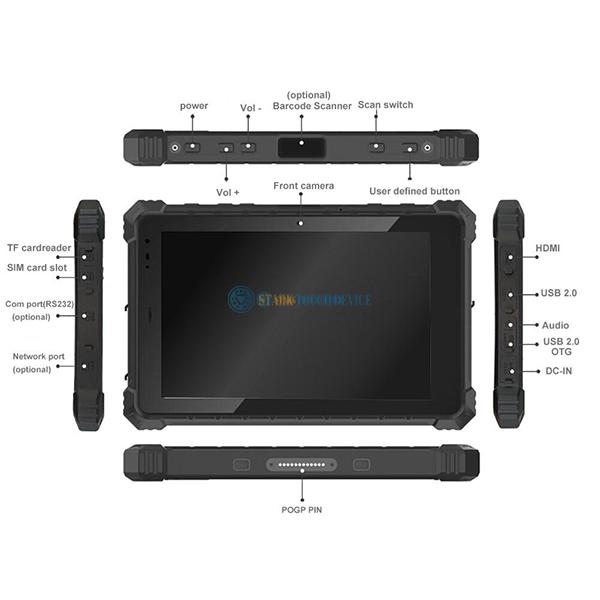
Another critical aspect is ensuring the converter supports the required data transfer rate. USB 3.0 devices connected to USB 2.0 ports on an ICC will operate at the slower USB 2.0 speed, potentially causing data bottlenecks. To avoid this, users should match the converter’s capabilities with the device’s requirements. In a high-speed data acquisition scenario, using a USB 3.0-to-USB 3.0 converter ensures optimal performance, preventing data loss or corruption during transmission.
Protocol Compatibility and Firmware Updates
Even when interface types align, protocol incompatibilities can disrupt communication. For example, a USB device using USB 3.0 protocol may not function correctly if the ICC’s USB port only supports USB 2.0 protocol. To resolve this, users should first confirm the protocol versions supported by both the ICC and the external device. If protocol mismatches exist, updating the device firmware or ICC drivers can often bridge the gap. Firmware updates may introduce new protocol support or optimize existing communication protocols for better compatibility. In a smart factory setting, updating the firmware of industrial cameras to support the latest Ethernet protocol can enable seamless integration with the ICC, facilitating real-time image processing and analysis.
Additionally, adopting standardized communication protocols like Modbus, OPC UA, or MQTT can enhance compatibility across diverse devices. These protocols provide a common language for data exchange, reducing the need for custom protocol conversions. For instance, in a water treatment plant, using Modbus protocol for all sensors and actuators allows the ICC to communicate with each device uniformly, simplifying system integration and maintenance.
Power Supply and Driver Management for Stable Operation
Power supply issues are a frequent cause of external device connection failures. ICCs typically provide limited power through their USB ports, with each port usually rated at 0.5A. High-power devices, such as external hard drives or industrial cameras, may require more current than the ICC can supply, leading to recognition failures or erratic behavior. To address this, users can employ several strategies. One option is to use externally powered devices, connecting them to a separate power source instead of relying on the ICC’s USB port. Alternatively, selecting low-power devices or those with built-in power management features can ensure stable operation within the ICC’s power limits.
Driver management is equally vital for maintaining compatibility. Outdated or incorrect drivers can prevent the ICC from recognizing external devices or cause communication errors. Regularly checking for driver updates from the device manufacturer’s website is essential. Installing the latest drivers can resolve compatibility issues, improve performance, and enhance security. For example, in a power generation facility, updating the drivers for vibration sensors connected to the ICC can ensure accurate data collection, enabling timely maintenance and preventing equipment failures.
Environmental Adaptability and Cable Selection
Industrial environments often expose ICCs and external devices to harsh conditions, including extreme temperatures, humidity, and electromagnetic interference (EMI). Selecting cables and devices with appropriate environmental ratings is crucial for reliable operation. For instance, in high-temperature environments, using cables with heat-resistant insulation can prevent cable degradation and signal loss. Similarly, in wet or corrosive settings, waterproof and corrosion-resistant cables ensure long-term durability.
EMI can also disrupt communication, especially in facilities with heavy machinery or high-voltage equipment. Shielding cables, such as shielded twisted-pair (STP) or coaxial cables, can minimize EMI effects. Proper grounding of shielded cables is equally important to divert interference away from the communication path. In an automotive manufacturing plant, using shielded Ethernet cables to connect robots to the ICC can prevent EMI from welding equipment from causing communication errors, ensuring precise robot control and production quality.
Future-Proofing Through Modular Design and Scalability
As industrial processes evolve, the need to add or upgrade external devices becomes inevitable. Choosing ICCs with modular designs and scalable architectures can future-proof the system, reducing the need for complete replacements. Modular ICCs allow users to add new interfaces or expansion cards as needed, accommodating emerging technologies without disrupting existing operations. For example, an ICC with PCIe slots can support high-speed data acquisition cards or advanced networking interfaces, enabling seamless integration of new sensors or communication protocols.
Scalability also extends to software compatibility. Selecting ICCs that support multiple operating systems and software platforms ensures flexibility in adopting new applications or integrating with existing enterprise systems. In a food processing plant, an ICC compatible with both Windows and Linux operating systems can run various control software, from legacy systems to modern, cloud-based solutions, facilitating a gradual transition to Industry 4.0 technologies.
