Welcome STARK TOUCH DEVICE!


Solutions
Industrial control computer printer data output
Industrial Control Computers and Printer Data Output: Streamlining Physical Documentation in Automated Systems
Industrial control computers (ICCs) manage complex processes across manufacturing, logistics, and energy sectors, generating vast amounts of data critical for operations. While digital monitoring dominates modern workflows, physical documentation via printers remains essential for compliance, audits, and on-site reference. Integrating ICCs with printers ensures seamless data output, combining real-time control with tangible records. This guide explores strategies for reliable, efficient printer data output in industrial environments.
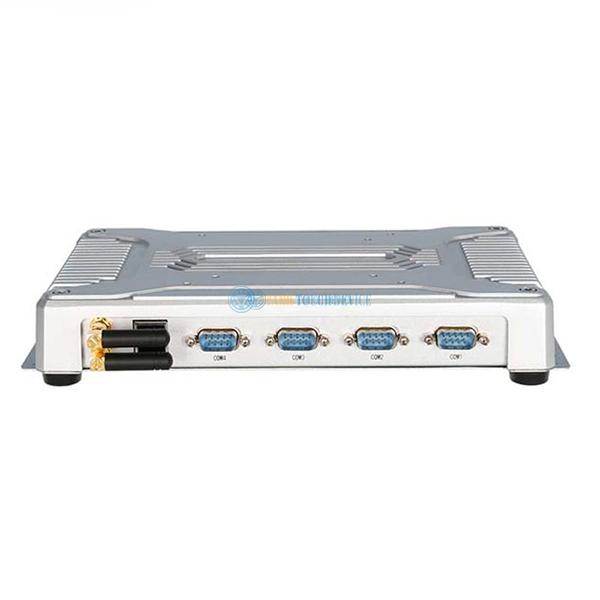
Designing Printer Integration for Industrial Data Output Needs
Effective printer integration begins with aligning hardware and software capabilities with operational requirements, ensuring compatibility and minimizing downtime.
Key considerations include:
Data Volume and Frequency: Assess how often and how much data needs printing. High-volume environments (e.g., packaging lines generating labels) may require industrial-grade printers with fast throughput, while low-volume tasks (e.g., monthly maintenance reports) can use standard models.
Print Content Complexity: Determine if outputs are simple text (e.g., error logs) or graphics-heavy (e.g., schematics, barcodes). Printers must support the required resolution and formatting to ensure readability. For example, barcode printers need precise dot placement to avoid scanning errors.
Environmental Durability: Industrial settings expose printers to dust, moisture, and temperature fluctuations. Choose models with ruggedized enclosures, sealed print heads, and IP ratings (e.g., IP54) to withstand harsh conditions. For explosive zones, verify compliance with safety standards like ATEX.
Connectivity Options: Ensure the printer supports interfaces compatible with the ICC, such as serial (RS-232/RS-485), Ethernet, or USB. For wireless needs, consider Wi-Fi or Bluetooth modules, but prioritize security to prevent unauthorized access.
Configuring ICC Software for Reliable Printer Communication
Seamless data transfer between ICCs and printers relies on proper software setup, including driver installation, protocol selection, and error handling.
Driver Installation and Updates: Install manufacturer-provided drivers to enable communication between the ICC’s OS and the printer. Regularly update drivers to fix bugs and improve compatibility with new ICC software versions. For legacy systems, use universal drivers if specific ones are unavailable.
Protocol Selection: Choose communication protocols based on speed and reliability needs. Serial protocols like Modbus RTU are simple but slower, suitable for low-volume tasks. Ethernet-based protocols (e.g., Modbus TCP, PROFINET) offer faster data transfer for high-volume or real-time printing (e.g., live sensor data on control panels).
Data Formatting: Configure the ICC’s software to format data correctly for the printer. This includes setting character encoding (e.g., ASCII, UTF-8), font sizes, and line spacing. For graphics, use vector formats (e.g., SVG) where possible to maintain clarity at different scales.
Error Handling: Implement logic to detect and resolve communication failures (e.g., printer offline, paper jams). For example, the ICC could retry sending data three times before logging an error or switching to a backup printer. Use status feedback from the printer (e.g., “busy” signals) to avoid data loss.
Advanced systems may incorporate predictive maintenance for printers, using ICC-collected data (e.g., print head usage, paper levels) to schedule proactive servicing.
Optimizing Print Workflows for Industrial Efficiency
Streamlining print processes reduces waste, improves response times, and ensures critical data is available when needed.
Batch Printing: Group similar print jobs (e.g., daily production reports) to minimize printer activation cycles, extending component lifespan. Use the ICC’s scheduling tools to trigger batches during off-peak hours.
On-Demand Printing: For time-sensitive data (e.g., quality inspection results), configure the ICC to print immediately upon event detection. Pair this with alerts (e.g., email notifications) to ensure operators retrieve prints promptly.
Paper and Consumable Management: Monitor paper and ink/toner levels via the ICC’s software to avoid mid-job shortages. Set thresholds to trigger automatic reorder requests or alerts to maintenance teams. Use recycled paper where possible to reduce costs and environmental impact.
Access Control: Restrict printer access to authorized personnel to prevent unauthorized or accidental prints. Use ICC-based authentication (e.g., user logins) or physical locks on printer panels. For sensitive data (e.g., financial reports), enable encryption during data transfer.
In multi-printer environments, use the ICC to route jobs dynamically based on availability or proximity to the requesting workstation. For example, if Printer A is busy, the ICC could automatically send the job to Printer B.
PREVIOUS:Industrial control computer UPS power supply adapter
NEXT:Industrial control computer alarm light linkage control
